LynxPoker players app: how players find your tournaments
The free LynxPoker app for iOS and Android: players find tournaments near them, watch the live clock and register from their phone. What it does for clubs.
LynxPoker has a free app for poker players, on iOS and Android, live on both stores since August 2026. Players use it to find tournaments near them, watch the live clock, see who is playing, follow chip counts and standings, and register from their phone. For a club owner, it is something else too: the place where players find your room.
This post explains what the app does, what it means for a club that runs on LynxPoker, and how to switch it on. If you are a player looking for a game, the second half is for you.


Short version: the app is free for players, and it is part of every LynxPoker plan for clubs. List your club, and your tournaments, your live clock and your registration show up on players' phones, run from the same tournament your staff runs in the room.
What the app does for players
- Find poker clubs near you and browse their tournaments.
- Watch the live clock: the level, the blinds and the time left, the same clock that runs on the club's TVs.
- See who is playing in a tournament, when the club shows its player list.
- Follow live chip counts and standings while the tournament runs, when the club shows them.
- Register from your phone when the club takes registrations in the app.
- Get a notification with your table and seat, and another if the floor moves you.
That is the whole list, on purpose. The app does a few things for players and does them from live data, not from a listing someone typed in last week.
Why it matters to a club owner
Most players hear about a tournament from a group chat, a flyer or a listing site. The details go stale, the start time changes, and the player who drives across town finds a different structure from the one they saw. The players app fixes that for your room, because it reads from the tournament you are actually running.
The clock in their pocket is your clock
When your director starts a level, the app shows that level. There is no second schedule to keep up to date and no listing to edit: the players app and the TVs on your wall read the same tournament. A player at the bar, in the parking lot or on the way to your room knows exactly where the night is.
Registration that does not touch the money
Turn on app registration and players connected to your club can reserve a spot from their phone. You still seat them and take payment, exactly as you do today. LynxPoker never processes buy-ins, never holds player funds and never pays out prize money, so app registration adds a list of names, not a payment system.
Fewer questions at the desk
Once a player is connected to your club, the app tells them their table and seat by notification, and tells them again if the floor moves them. The questions your desk answers all night (what level is it, when is the break, where do I sit) mostly answer themselves.
A tournament page that answers the usual questions
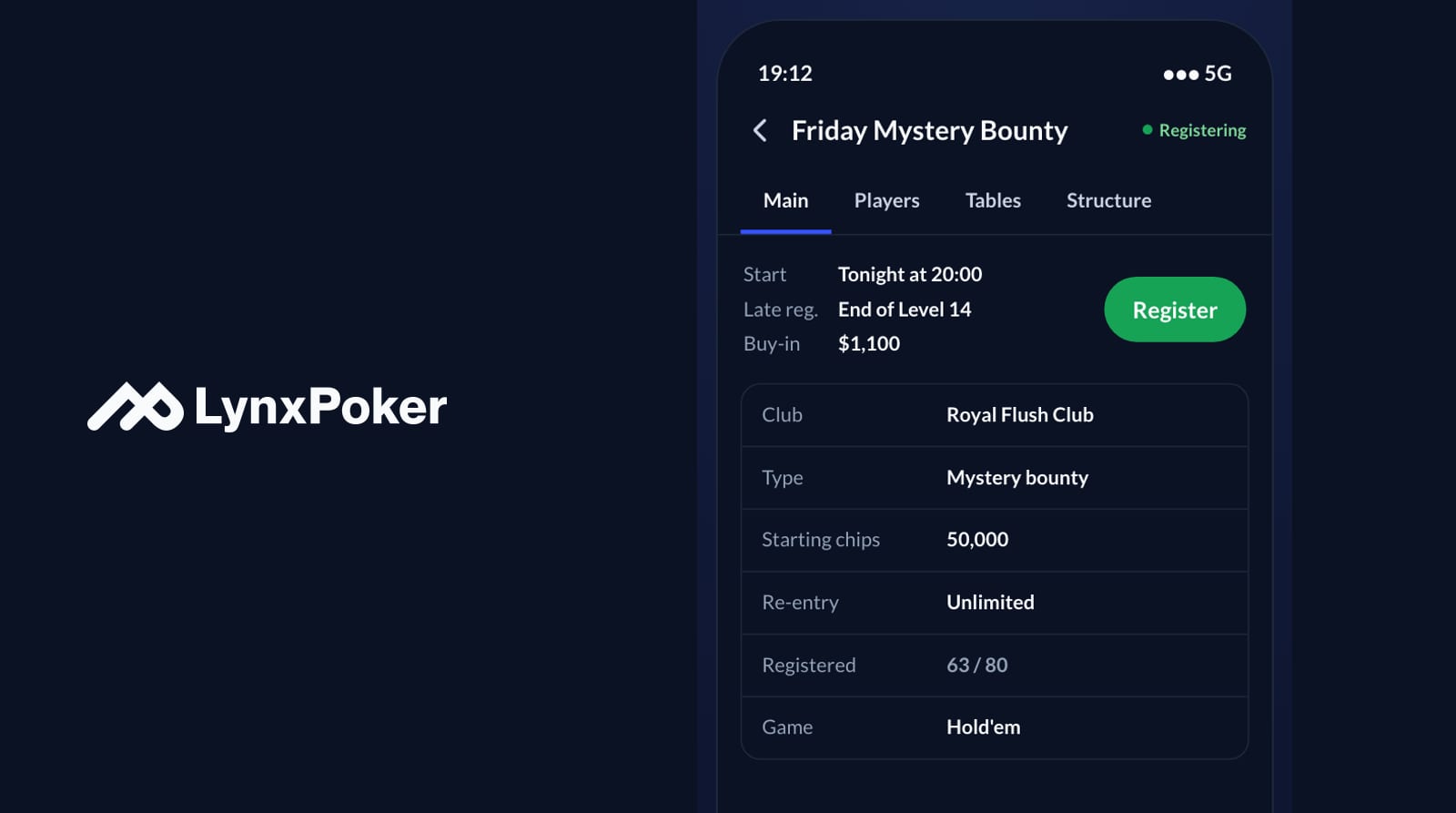
Each tournament you publish gets its own page in the app. The main tab shows the start time, when late registration closes, the buy-in, the starting chips, the re-entry rule and the game, and how many have registered against the cap when you show it. Next to it sit tabs for the structure and, when you publish them, the players and the tables. Players do not need to call the desk to ask what the structure is or whether there is still room, because the page already says so, and it stays right because it is your tournament, not a copy of it.
That is the difference from a listing site. A listing is only as good as the last time someone updated it. The players app has nothing to update: when your director changes the late registration level or the cap, the page changes with it.
See it from the club side
How to put your club in the app
Everything is in the club settings of LynxPoker, and there is a live phone preview next to it, so you see what players will see before you switch anything on.
- List your club publicly. Your club then shows in the app's directory and in nearby search.
- Fill in your club profile: a cover photo, a few words about the room, your phone, WhatsApp, website and social links, and your opening hours.
- Choose what players see. The clock, blinds, structure and buy-in always show; the player list, chip counts, tables and seats, and finishing places are each a switch.
- Turn on app registration when you are ready for players to reserve spots from their phones.
- Print the players app poster. It comes in a few styles, including a table card that folds to stand on a table, so players can scan it in the room.
- Show the app on the seating receipt. The receipt can carry a QR code that links to the players app.
You also decide how the clock looks: pick which values each side of the clock shows, and the wall and the players app follow.
What it costs
For players, nothing: the app is free. For clubs, the players app is part of every LynxPoker plan, not an extra. Plans include credits, where one credit is one player in one tournament, and re-entries, rebuys and add-ons are free. Reg is $200 a month with 400 credits, and the price per player goes down to 33¢ on Elite. You can try every feature, the players app included, free for 3 tournaments within 14 days, with no card.
Plans and comparisons
For players: how to use it
Download LynxPoker from the App Store or Google Play. Open it, allow your location or pick a city to see clubs around you, and browse their tournaments. Tap a tournament to see its structure, the live clock once it starts, and who is playing.
- To register, sign in and tap Register on a tournament from a club you are connected to, when that club takes registrations in the app. Your spot is reserved; you pay at the club, as always.
- Turn on notifications when the app asks, so it can tell you your table and seat.
- During the tournament, follow the clock, the chip counts and the standings from your phone, even while you are away from the table.
The app only shows clubs that run their tournaments on LynxPoker and chose to list themselves. If your club is not there yet, tell them about it.
Players app questions
Is the LynxPoker players app free?
Yes. The app is free for players on iOS and Android. Clubs pay for LynxPoker itself, and the players app is part of every plan.
Can I pay for a tournament in the app?
No. Registering in the app reserves a spot. You pay at the club, and LynxPoker never processes buy-ins, never holds player funds and never pays out prize money.
Do my staff need the players app?
No. The players app is for players. Your floor and your dealers use the Floor app and the Dealer app, which run in a browser with nothing to download.
Which clubs are in the app?
Clubs that run their tournaments on LynxPoker and list themselves publicly. A club can also stay out of the directory and still use LynxPoker for its room.
Join the newsletter
Product updates, tournament playbooks, and seasonal promotions. Usually once or twice a month, no spam.